 Kenal
KenalKenal Grant
Disburse grants against evidence, not paperwork.
Every invoice is checked against the approved budget and milestone criteria before a payout is approved. Your officers see what matches, what doesn't and why, and every decision lands in a full audit trail.
Last updated
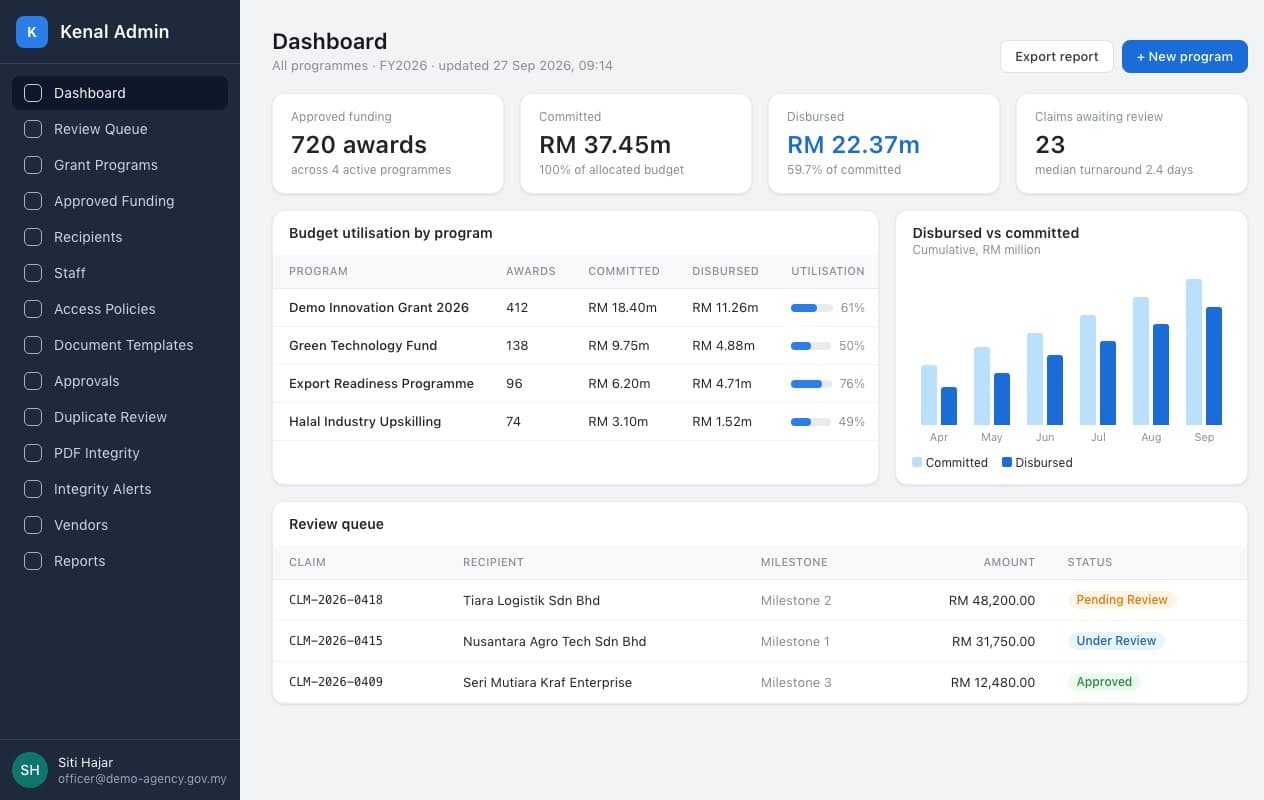
What Kenal Grant is
Kenal Grant is a grant management platform for funding agencies that checks every claimed invoice and receipt against the approved budget and milestones before a payout is approved.
It runs a funding agency's programmes from award to disbursement. Recipients file claims in a guided portal, Kenal Grant reads and checks every document, and your officers approve through the agency's own chain with the evidence in front of them.
What changes
Grant teams lose weeks to manual invoice checks, and problems often surface only after the money has gone.
- Checking claims
- Then: Officers compare invoices to budgets by hand, line by line.
- Now with Kenal: Every line is matched to its budget item and milestone automatically, with reasons.
- Timing
- Then: Ineligible spending is found in an audit, after payout.
- Now with Kenal: It is flagged before anyone approves the payout.
- Evidence
- Then: Spreadsheets, email threads and paper files.
- Now with Kenal: One record per award, with every document, decision and approval.
How it works
Six steps take an award from approval to disbursement.
Set up the programme
Budget, dates, expense categories and the documents each category needs.
Approve the award
Each recipient's itemised budget, cost-share split and milestones.
Recipient files a claim
Line items against the approved budget, with invoices, receipts and payment proof.
Kenal Grant checks the evidence
Every document read, matched to its budget line and checked against the milestone criteria.
Your officers approve
A reviewer decides, then the agency's own multi-level approval chain signs off.
Record the payout
The disbursement is recorded and the board's disbursement table is produced.
Every invoice checked against the milestone
Kenal Grant reads the invoice, matches each line to the approved budget and checks it against the milestone criteria. Lines outside the approved scope are flagged before review, with the reason in plain language.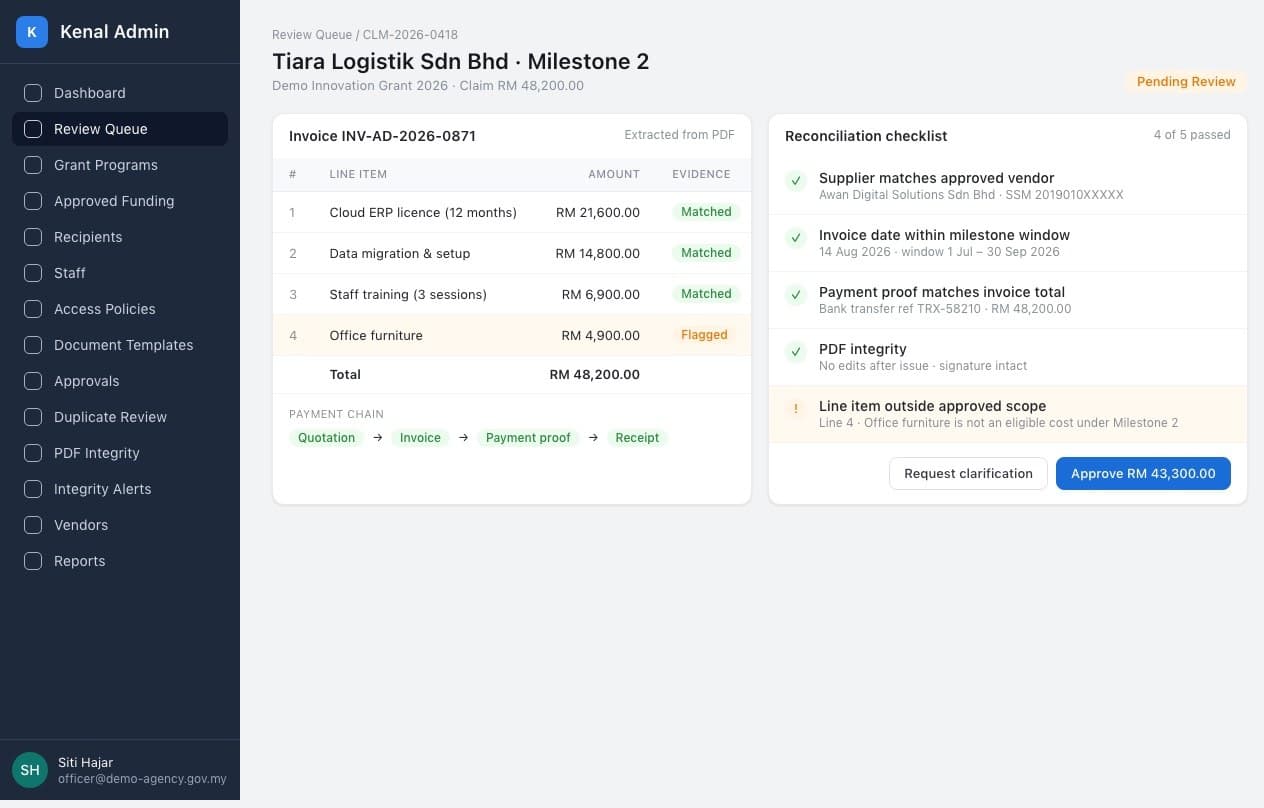
Approval through your own chain
The reviewer decides on the whole claim, then the payout goes through the multi-level approval chain your agency defines for the programme, with the payee account verified and the amount confirmed at every step.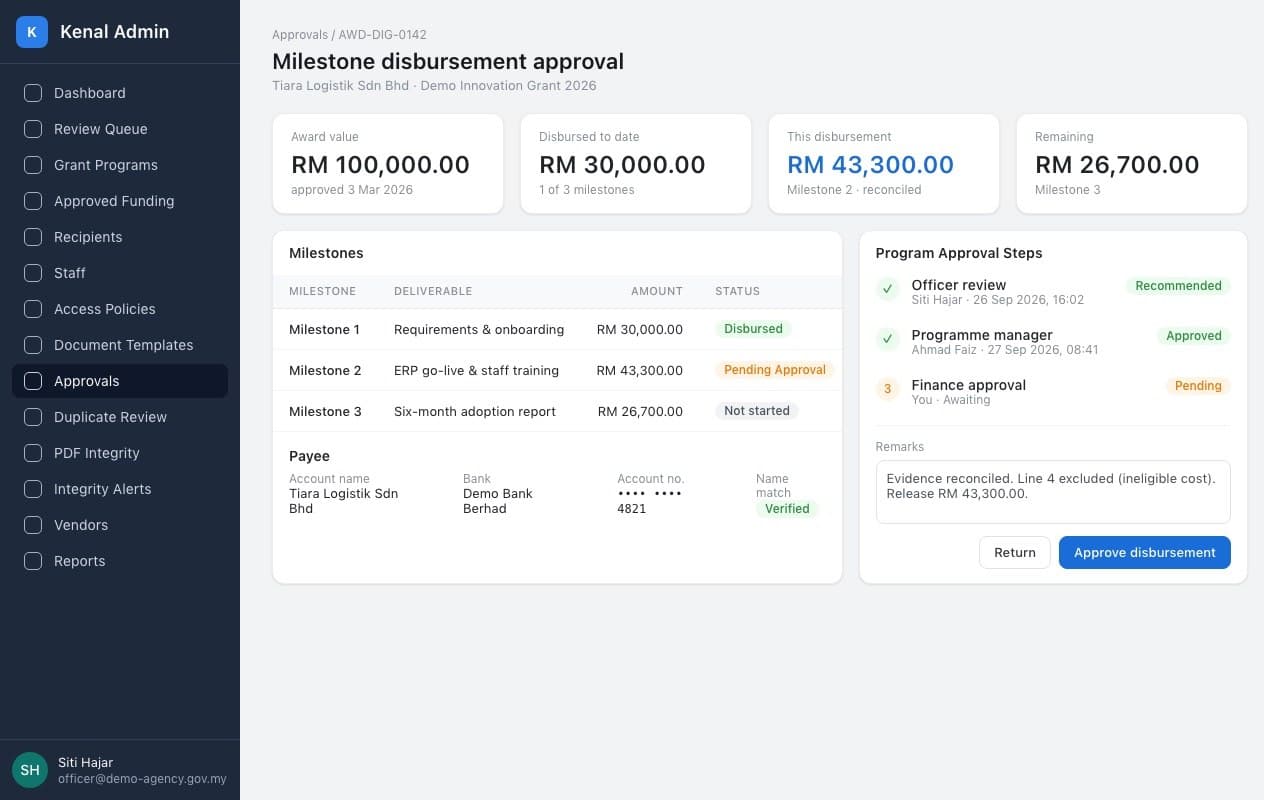
A full audit trail on every award
Every action by an officer, a recipient or a system check is timestamped and hash-chained. Internal audit can verify the whole history of an award in one view.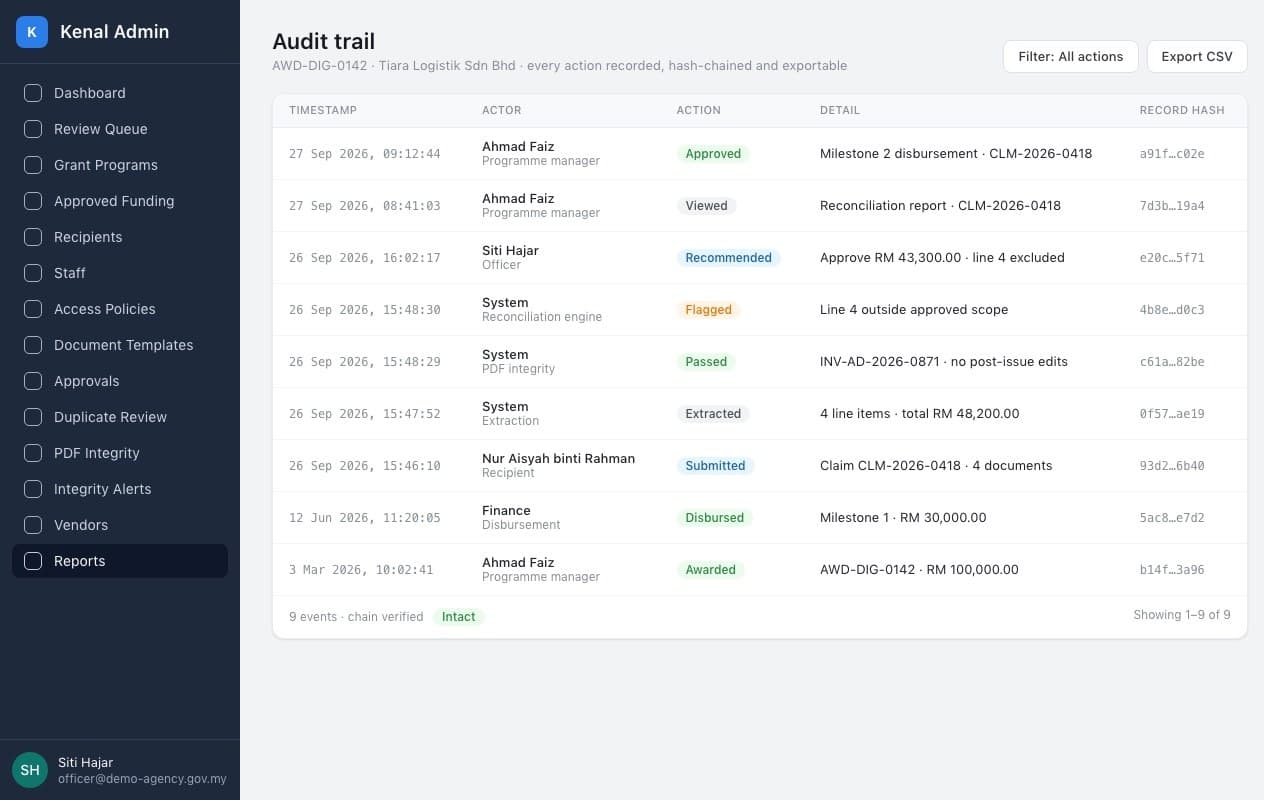
What you get
Proof that every ringgit paid out was backed by evidence.
A checked claim
Every line matched to the approved budget and milestone, with the reason for each flag.
The payment chain
Quotation, order, invoice, delivery, payment and receipt, lined up for each claimed item.
An approval record
Who reviewed, who approved and when, through your own approval chain.
Board-ready reporting
A disbursement table for each payout and programme reports on how much of each claim is backed by documents.
Capabilities
Programmes and awards
- Programme set-up with budgets, dates, expense categories and required documents
- Itemised approved budgets with a cost-share percentage per line
- Milestones and tranches per award
- Reallocation between budget items, recorded in a ledger
Claims and evidence
- A guided claim portal for recipients, with the remaining balance shown live
- Reads quotations, orders, invoices, receipts, transfer slips and bank statements
- Reimbursement, direct supplier payment, or both on one claim
- Foreign-currency documents, with the ringgit amount taken from the payment proof
Checks
- Each document matched to its budget line and milestone criteria
- Rules for amounts, dates, bank details and supplier records
- PDF integrity checks on every upload
- Duplicate invoice detection across line items
Review and payout
- A reviewer workspace with the payment chain for each item
- Multi-level approval chains per programme
- Disbursement recording and a board disbursement table
- Notifications and reports for officers and management

How it fits your agency
Kenal Grant works alongside the systems and governance you already have. The money still moves through your own bank.
- Your approval chains, set per programme, with no change to who signs off
- Payouts made through your own bank, then recorded in Kenal Grant
- Recipients invited by your officers, with no public sign-up
- Excel exports for finance and the board
Compliance and security
Built for public money: every decision explained, attributed and preserved.
- Chained audit trail
- Key actions on every award are timestamped, attributed and hash-chained.
- People decide
- Checks advise with reasons. Officers and approvers make every decision.
- Invitation-only access
- Accounts are created by the agency, with one-time-code sign-in and rate limits.
- Roles and modules
- Role bundles plus per-person module access, so officers see only what they need.
Questions buyers ask
How does Kenal Grant check a claim before payout?
Kenal Grant reads every document in a claim and checks it against the approved budget and the milestone criteria before anyone approves a payout. It matches each invoice line to its budget item, follows the money trail from quotation to bank statement, and flags anything outside the approved scope, over the approved amount or inconsistent between documents, with a plain-language reason for the reviewer.
Which documents can recipients submit?
Recipients can submit the full paper trail of a claim, from quotations, purchase orders and invoices to delivery orders, payment vouchers, official receipts, transfer slips and bank statements. Kenal Grant also reads supplier company profiles and statutory contribution receipts. Foreign-currency invoices are handled too, with the ringgit amount taken from the payment evidence rather than an assumed exchange rate.
Does the AI approve payouts?
No. Kenal Grant's checks advise and your officers decide. Every flag comes with the reason and the evidence behind it, a reviewer makes one decision on the whole claim, and the payout then runs through your agency's own multi-level approval chain. Each step is recorded against the person who took it, so accountability stays exactly where your governance puts it.
Can Kenal Grant handle reimbursement and matching grants?
Yes. Kenal Grant supports reimbursement to the recipient, direct payment to the supplier for matching grants, and a mix of both on one claim, including deposits and instalments. Each budget line carries its own cost-share percentage, so the agency's share is calculated line by line, and claims are assessed before tax and after discounts, in line with typical programme rules.
What does the audit trail record?
The audit trail records every key action on an award, from budget approval and claim submission to each check, review decision, approval step and recorded payout. Each entry is timestamped, tied to the officer, recipient or system check that made it, and hash-chained, so anyone can verify the record has not been altered when internal audit or an external examiner asks.
How long does it take to set up a grant programme?
A programme can be set up in the console by your own staff, without a software project. You enter the budget, dates, expense categories and the documents each category requires, then invite recipients by email. Kenal's team helps you configure your first programmes and approval chains, so officers can start reviewing claims as soon as recipients begin filing.
Used with
Read supporting bank statements, onboard recipient companies and stamp award agreements with the rest of Kenal.
See Kenal Grant with your programme
Tell us how your programmes pay out today. We will walk you through a claim from filing to approval, configured for your rules.