 Kenal
KenalKenal Automate
Submit to government portals with no API, without the re-keying.
An AI agent in your team's browser reads the source documents, fills the portal's forms and submits them. Live today for customs declarations.
Last updated
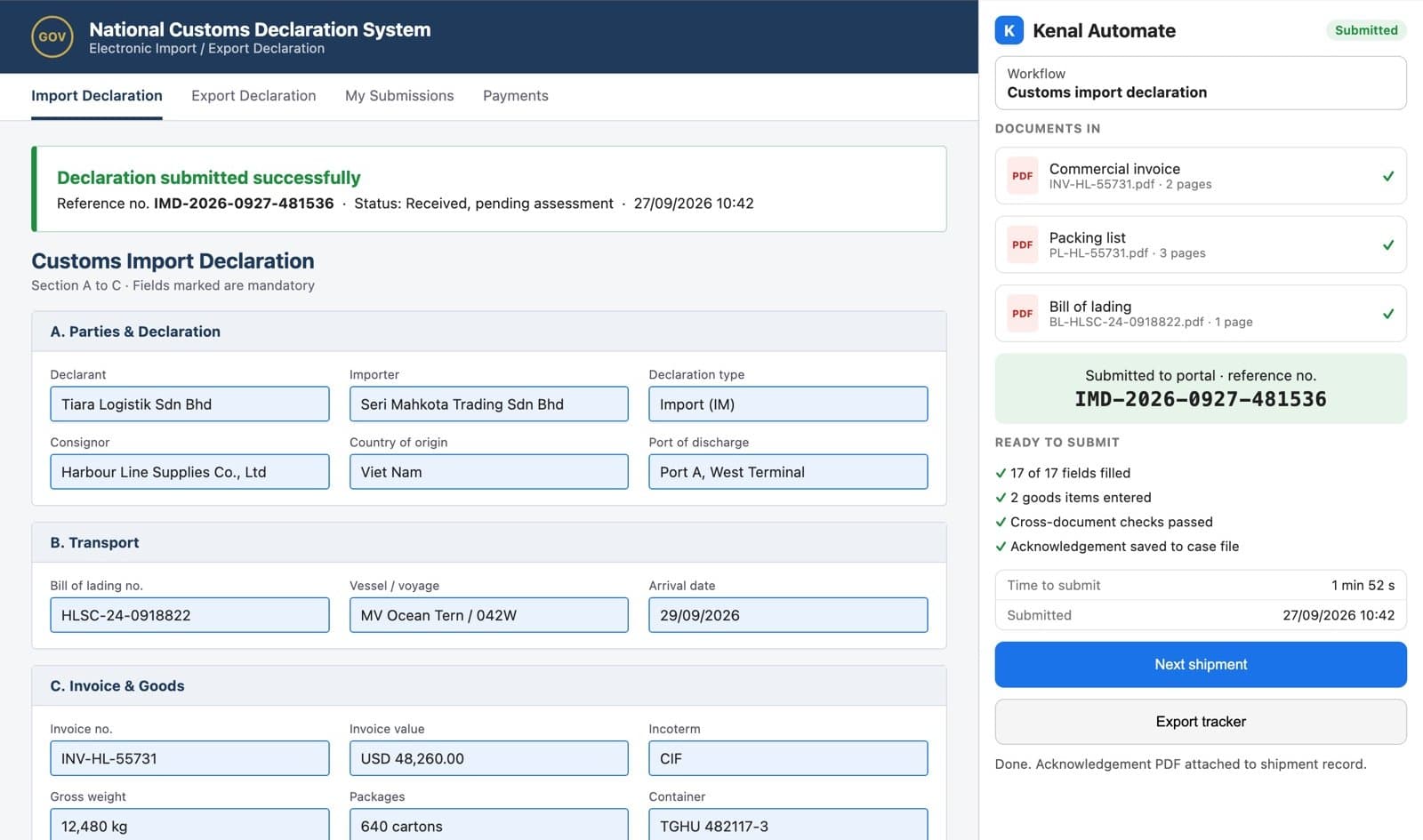
What Kenal Automate is
Kenal Automate is a browser-extension AI agent that reads source documents and fills and submits forms on government portals that have no API, starting with customs declarations.
Many government filings still mean reading a stack of documents and typing the same data into a web form. Kenal Automate does that work in the browser your staff already use, so there is no integration project and nothing for the agency to change.
- admin productivity per staff member
- 4x
How it works
Three steps from a stack of shipping documents to a filed declaration.
Read the documents and check them against each other
Drop in the invoice, packing list and bill of lading. Kenal Automate extracts the shipment fields and checks the documents agree with each other before anything is filed.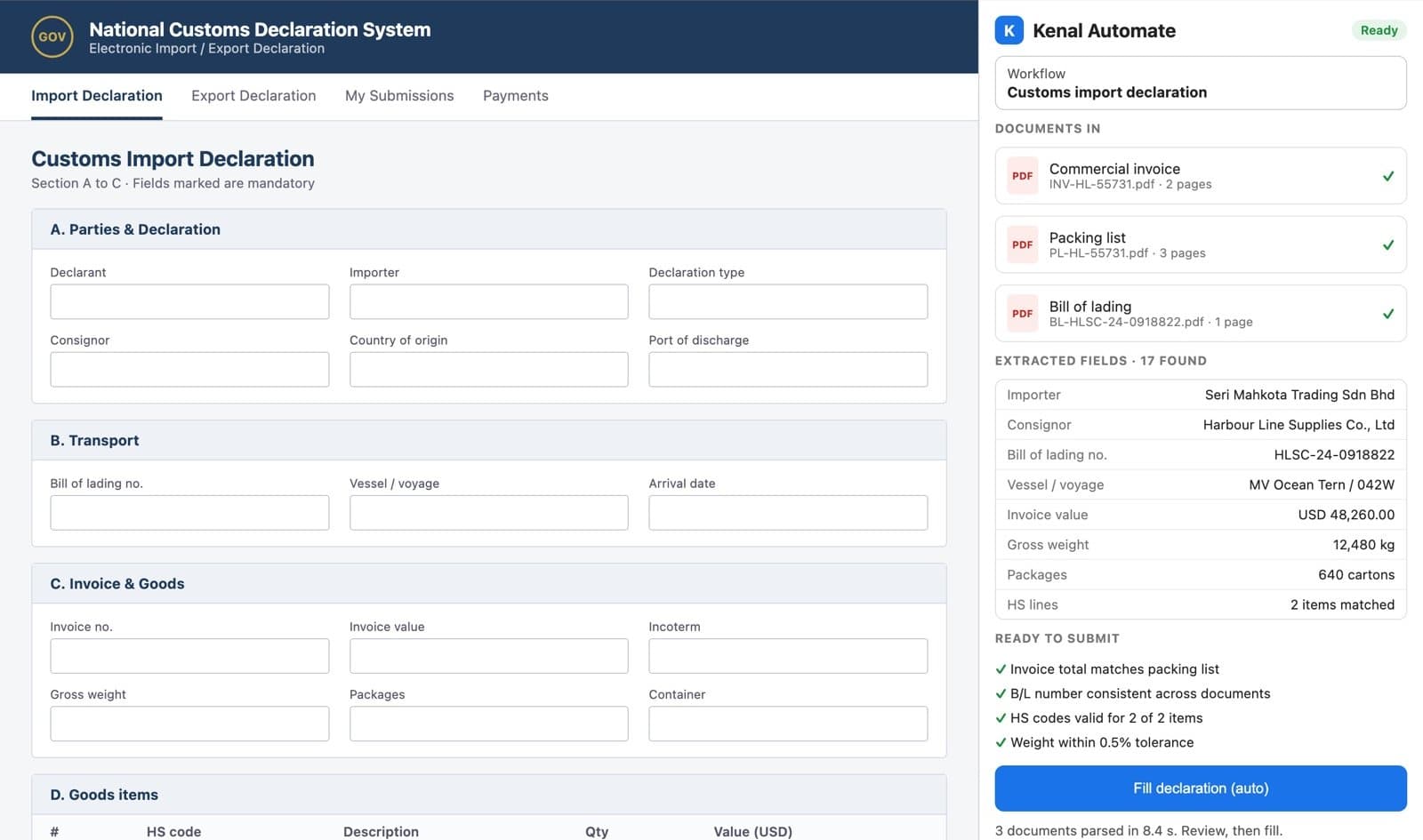
Fill the portal form, section by section
The agent fills the portal's own form in the staff member's browser, field by field, with progress shown as it goes. Staff can watch, review and step in at any point.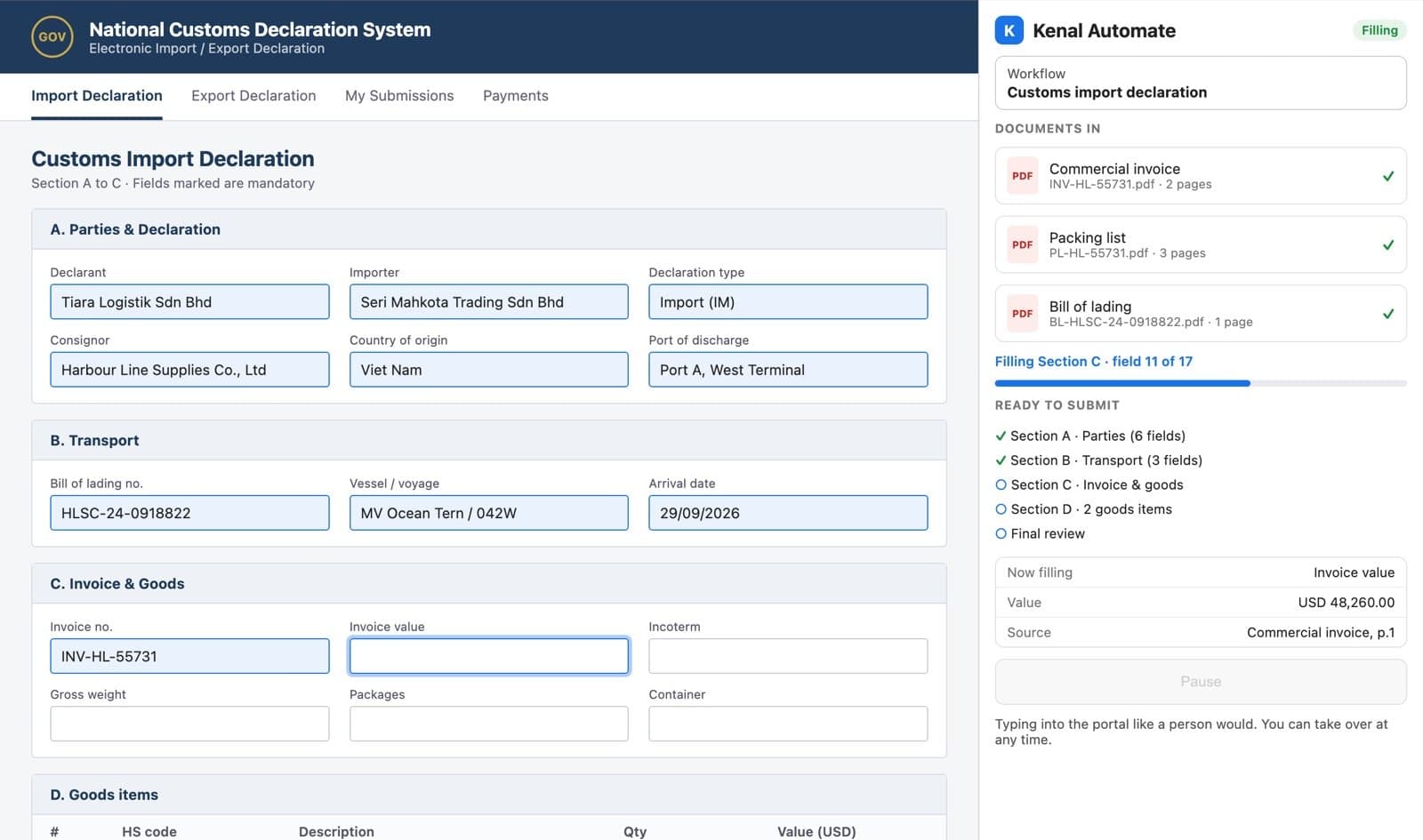
Submit and keep the reference
The declaration is submitted on the portal and the reference number is captured, so every filing has a record of what was sent and when.
What changes for your team
- Data entry
- Then: Staff read each document and key every field by hand.
- Now with Kenal: The agent extracts the data and fills the form.
- Errors
- Then: Mismatches between documents are found after a rejection.
- Now with Kenal: Documents are checked against each other before filing.
- Capacity
- Then: More filings means more admin headcount.
- Now with Kenal: Four times the filings per staff member.
What you get
Filed submissions
Declarations filed on the portal, with the portal's reference number captured.
Checked data
Fields extracted from the source documents and cross-checked before filing.
A record per filing
What was submitted, from which documents, and when.
Staff time back
Admin teams spend their hours on exceptions instead of typing.
Capabilities
Reading and checking
- Extracts fields from invoices, packing lists and bills of lading
- Cross-document checks before filing
- Handles documents from different shipping lines and suppliers
Filing
- Fills and submits government portal forms that have no API
- Works inside the browser staff already use
- Live for customs declarations, expanding to court e-filing

How it fits your stack
Deployment is a browser extension on your team's machines, not an IT project.
- A browser extension, installed on the machines your team already uses
- Runs in the staff member's own signed-in portal session, under their access
- A side panel beside the portal, with a queue of filings to work through
- Works alongside Kenal Stamps, which files LHDN stamp duty through Kenal SHEAR
Compliance and security
The agent works where your staff work, under their own access, with a record of every filing.
- Your own session
- Filings run in the staff member's signed-in portal session, under their own access.
- Visible work
- Every field is filled in plain view, and staff can step in at any point.
- A record per filing
- The submitted data and the portal reference are kept for each filing.
- Checks before filing
- Source documents are cross-checked before the agent submits.
Questions buyers ask
What does Kenal Automate do?
Kenal Automate is an AI agent that does the data entry into government portals that have no API. It reads your source documents, such as invoices, packing lists and bills of lading, checks them against each other, then fills and submits the portal's forms inside your staff member's browser. It is live for customs declarations and expanding to court e-filing.
Does the government portal need an API or an integration?
No. Kenal Automate works on the portal exactly as your staff see it, inside the browser they already use, so there is no integration project with the agency and nothing for the agency to build. If a person can file it through the portal's web forms, Kenal Automate can be trained to file it the same way, faster.
Which filings does Kenal Automate support today?
Kenal Automate is live for customs declarations, reading shipping documents and filing the declaration on the customs portal. Court e-filing is next. Because the same agent learns any web form, other high-volume government filings can be added. Tell us which portal your team keys into most, and we will scope it with you.
How much time does Kenal Automate save?
Kenal Automate delivers four times the admin productivity per staff member. Instead of reading documents and keying dozens of fields into each form, your staff review the extracted data and let the agent fill and submit the declaration. The same team handles far more filings, and the hours saved go to exceptions and customer work.
Do staff stay in control of what gets submitted?
Yes. Kenal Automate works in the staff member's own browser session, shows the extracted fields and the cross-document checks before it files, and fills the form section by section in plain view. Staff can review and step in at any point, and every submission is recorded with the portal's reference number.
Used with
Use Kenal Automate for the government filings your other Kenal workflows produce.
Tell us which portal your team keys into
We will show you Kenal Automate on customs declarations and scope the filing your team spends the most time on.